
Programming / Game Dev


Text Based Rhythm Visualiser
A flexible engine to create custom text visualisations synced to music.
Solo Programmer
April 2023 - Ongoing


Responsibilities + Skills Used:
-
.NET Framwork
-
Composite Design Pattern - Interpolation - Subgenerators
-
OOP Principles (Inheritance, Abstraction)
-
Mathematics
About the Project
-
This project was inspired by videos with animated visuals synced to music (see the video right)
-
I wasn't aware of any software that helped make these sorts of visualisations, so I embarked to create an engine that let you animate with text, as well as letting you write custom effects.
Engine Structure
The engine uses a 'layer' workflow, similar to other non-linear creative software like FL Studio, Krita, and Vegas Pro.
This helps create a non destructive workflow to make edits and changes a lot easier.
The engine stores a list of Generators that output text based on a given time.
A Display class prompts each generator for an output, and overlays them on top of each other and returns a string to be printed as the current frame.

Generators
A generator stores a plugin, a collection of effects, and a blending mode.
When prompted for an output, it generates text from it's plugin, then applies all of the effects, and returns the final result with the generator's blending mode.
Plugins
All plugins inherit from a base class that has a function to generate text based on a given time.
Plugins have various parameters that allow you to control details about the text it generates.
These parameters can be automated with Interpolation Curves.
The "Divider" plugin divides a square in half based on a given angle.
The angle parameter here is -45.

The "Noise" plugin creates a noise effect of with a given brightness.
The brightness parameter here is 0.5

Effects
Effects transform already generated text, and also have their own automatable parameters.
The "Transform" effect handles position, rotation, and scaling.
The rotation parameter here is interpolating between -90 and 90.
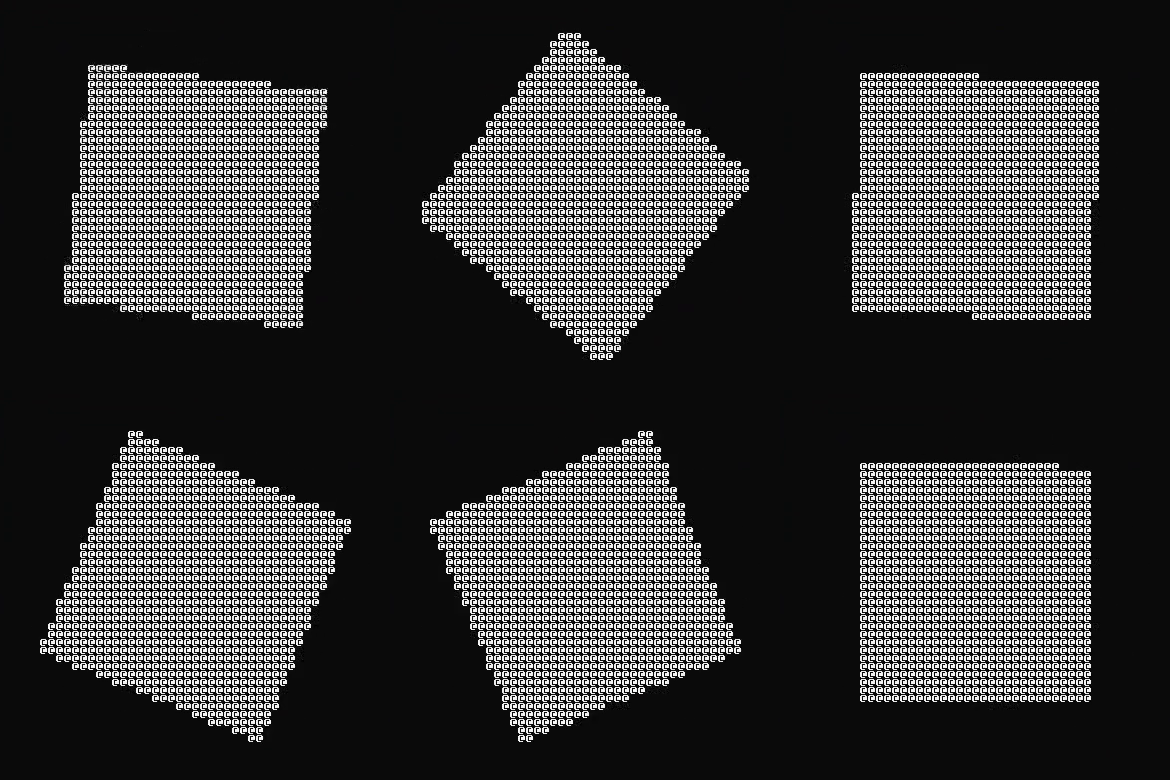
The "Offset" effect wraps text around the edges based on a given amount.
The xOffset and yOffset parameters here are interpolating between 0 and 1.

Interpolation Graphs
One of the biggest steps in this project was implementing automation, used in other non-linear software.
Interpolation Graphs are defined by a list of times and values, linked by different methods of interpolating between each point (easeIn, easeOut, linear, hold, etc.).
Using a composite design pattern, an interpolation graph can be converted to and from strings.
They both implement an IStringable interface; the points implement it with a custom ToString() function, the graph implements it by combining the ToString() output of the points.
Interpolation Graph Representation

Interpolation Graph Exported To String
0>1;1.5>0.5;sin;[2.5]
1>1.25;0.5>3;linear;[]
1.25>1.5;3>3;hold;[]
1.5>2;3>0;easeOut;[2]
2>3;0>0;hold;[]
Interpolation Graph used in context

The stringified representation of the Interpolation Graph includes the timing, value, the interpolation type, and any other values that define the interpolation, such as easing strength.
Parameters
Plugin and effect parameters are specified via flags.
The goal is to have animations stored via text, which involves specifying parameters via string. Flags seemed like the best string based option to achieve this with, as it's so flexible.
Plugins specify a list of parameters with a long and short flag to be interpreted.
TextDisplay Plugin:
Words: -w / --words
Word Interpolation: -wI / --wordInterpolation
Delimiter: -d / --delimiter
Offset Effect:
X Offset Interpolation: -xOI / --xOffsetInterpolation
Y Offset Interpolation: -yOI / --yOffsetInterpolation
When parsing flags, I use regex to split the string into a list of flags and their values.
I initially split the string by spaces, but this introduced issues when the flag's values included spaces. I switched to regex to specify more detailed rules for splitting strings.
"--words a-c,d f,g-i -wI 0;0 -d ,"
(--?\w+)\s([\s\S]+?)(?=\s--?\w+|\s*$)
--words a-c,d f,g-i
-wI 0;0
-d ,
Display
The display class handles overlaying text.
Various blending modes can be used to change how the text is overlaid.
By linking specific characters to a brightness value, they can be multiplied with with other characters, including many other operations like addition, inversion, and division.
Generator outputs include a draw point.
This describes where on the final text the generator output should be placed.
The squares on the right all have different draw points and blending modes.
(Subtract, Behind, Invert, Addition)

Next Steps
Export complete animations as text files.
One of the goals of this project was to save and load animations to text files. I'm making progress towards this by having Parameters and Interpolation graphs take strings to construct an instance of their class.
Currently, I'm looking into instances of Plugins being created from their name as a string.
Custom C# Plugins and Effects
Another goal was to allow for custom effects and plugins. In future, I'll keep the open-closed principle in mind to help achieve this by somehow accepting custom C# files. I'll have to do research on how to implement this.
Implement GPU acceleration on Plugins / Effects.
Some effects/plugins take more time than others; they require time consuming maths (e.g. the rotation effect) or are complex and shader based (The sparkle plugin). By delegating the load to the GPU, the time it takes to generate an output will be significantly reduced, leading to faster frame rates being possible.